 ActivMan
Online Help v3.3
Browse the contents on the left, or jump straight to a topic. Looking for the latest version? See Online Help (Latest).
Creating a new database connection
- Select 'New' on the 'File' menu, and select 'Database'
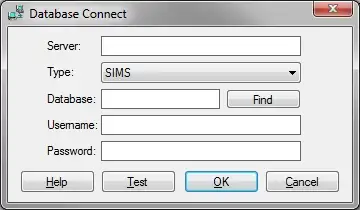
- Enter the name of the server (NETBIOS name) and SQL instance, e.g. "SERVER\SIMS"
- Select the database MIS type
- Enter a username and password to access this database/server
- Enter the database or click 'Find'. Find will attempt to "find" the database for you.
- To test the entered settings, click 'Test'.
- Click 'OK' when finished
Find
If you are unsure what the database name is then enter the server, username, and password, then click 'Find'. The prorgam will connect to the specified server and attempt to find the correct database for the specified MIS.
Test
Once you have entered the server, database, username, and password, you can click 'Test' to test the connection to the database.