 ActivMan
Online Help v3.3
Browse the contents on the left, or jump straight to a topic. Looking for the latest version? See Online Help (Latest).
Modifying existing users
You can modify the following attributes of existing accounts:
- Username
- Display Name
- Description
- Password
- Logon Script
- Profile Path
To modify existing users simply:
- Highlight all the users you wish to modify
- Right-click anywhere in the list of users and select 'Modify'
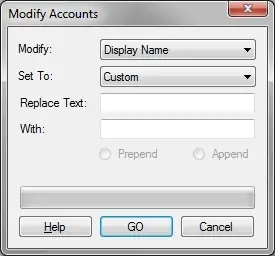
- Select which attribute you would like to modify of the selected users, i.e. 'Username'
- Select whether you would like to set the attribute to duplicate another attribute or to enter a custom value.
- For the custom option
- Enter the text you would like replaced (optional), i.e. 'yr7'
- Enter the text you would like to be replaced with, i.e. 'yr8'
- If 'Replace Text' is empty then you can select either 'Prepend' or 'Append'
- Click 'GO' when finished
Prepend/Append
The 'Prepend'/'Append' options are only available if 'Replace Text' is empty. This is useful if you simply need to add text to an attribute either at the beginning or the end.
Delete Text
To delete text simply enter nothing for 'With', assuming there is text in 'Replace Text'. If not, then nothing will be modified.
To reset passwords in mass
To reset the passwords of multiple users, to the same password, simply:
- Select 'Password'
- Enter the new password in 'With'
- Click 'GO' when finished